Lesson 4: Platforms for Working with Neural Networks
You already know how to formulate prompts—but where do you apply them? ChatGPT or Claude is not a single entry point, but an entire ecosystem of access methods, and for users from Russia, the choice of platform is of particular importance. In this lesson, we will break down what types of platforms exist, how they differ, and how to choose the right one for your task.
Three Types of Platforms
Regardless of which model you want to use—GPT, Claude, Gemini, or any other—the method of accessing it usually falls into one of three types.
1. Official model websites and apps. This is the familiar chat interface—chat.openai.com, claude.ai, gemini.google.com, and similar ones. A simple dialogue with one specific model, minimal settings, and a format familiar to everyone. A VPN is usually required from Russia.
2. Playground / developer console. A sandbox for testing—for example, OpenAI Playground, Anthropic Console, or Google AI Studio. Unlike a regular chat, there is no wrapper in the form of hidden system instructions and history here—you see the model in its pure form and manage all parameters manually. Payment is usually per token, not by subscription. A VPN is also most often needed from Russia.
3. Aggregators. Services like Bothub combine access to several models from different companies (GPT, Claude, Gemini, DeepSeek, etc.) in a single interface, without the need for a VPN, and often include ready-made presets and their own API.
| Platform Type | Needs VPN from Russia | Models | Parameter Tuning | Who It's For |
|---|---|---|---|---|
| Official chat (ChatGPT, Claude, Gemini) | Usually yes | One company's model | Minimal or none | Everyday communication with AI |
| Playground / developer console | Usually yes | One company's model, but all versions | Full access to all parameters | Testing before development, developers |
| Aggregators | No | Multiple models from different companies | Yes, via a unified interface | Universal use without a VPN |
Playground: A Sandbox for Testing
A Playground is a tool designed not for everyday communication, but for experiments. Here you see the model exposed: without hidden system instructions, without automatic memory of previous messages. You build the context yourself. It is the perfect place to:
- check how the same prompt behaves at different values of temperature, top_p, and other parameters (we will cover them in detail in the next lesson).
- see the raw request that the platform sends to the model—this is useful if you plan to work directly via API later.
- test a system prompt for a future product (e.g., a support bot) before paying for real requests in production.
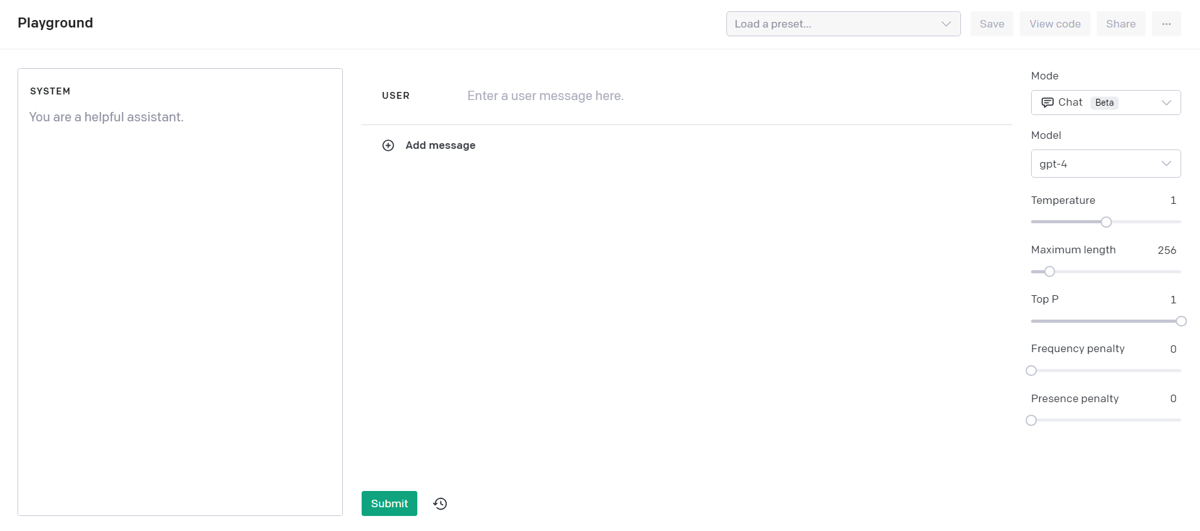
The logic is the same in the OpenAI Playground, the Anthropic Console, or Google AI Studio—only the parameter names and interface design differ.
Aggregators: When You Need Access Without a VPN and to Multiple Models at Once
If a VPN is not an option, or you want to compare answers from different models without switching between a dozen tabs, aggregators come to the rescue. For example, we provide:
- access without a VPN, directly from Russia.
- multiple models (GPT, Claude, Gemini, and others) under one account and one payment.
- ready-made presets for typical tasks so you don't have to set everything up from scratch.
- documentation to help resolve your questions.
- our own API, compatible with the OpenAI specification—we will talk more about working with the API in the lesson on plugins and APIs.
- parameter settings for various models, just like in a Playground.
For practical reasons, you should choose an aggregator if you value: no need for a VPN, access to multiple models at once, and a single bill for everything.
Access via Telegram Bots
Another method is Telegram bots, which provide access to neural networks without registering on a website or installing apps. It's convenient, but homemade and unverified bots have typical limitations:
- limits on the number of requests—for example, a few requests per hour.
- unknown model version—it is often impossible to understand exactly which model you are communicating with, and whether it has been swapped for an older and cheaper one.
- instability—integration with a neural network requires support on the bot developers' side, and during outages, the bot may simply not respond.
Bots from major aggregators (like ours, for example) usually do not have such problems.
How to Choose the Right Platform for You
Before registering everywhere, ask yourself a few questions:
- Do I need one specific model, or do I want to compare different ones? One model -> official website. Multiple -> aggregator.
- Am I going to fine-tune parameters (temperature, top_p, etc.) or just chat? Fine-tuning -> Playground/console. Regular chatting -> chat interface.
- Am I ready to work through a VPN? If not, the choice narrows down to aggregators.
- Do I plan to integrate the model into my application in the future? If yes, experience working in both a Playground and with an API will be useful.
In the next lesson, we will analyze in detail the parameters that become available specifically in Playground-like tools—temperature, top_p, repetition penalties, and context length. This is exactly the full access to settings mentioned above.