Lesson 2: Code Generation with Claude. Part 1
In this lesson, we will explore how ChatGPT can be used to automate coding, especially when working with boilerplate or repetitive code.
Boilerplate code is code that is repeated over and over again without significant changes. Developers often have to write this kind of code, and automating this process can be very useful. This is where ChatGPT can come to the rescue.
Creating a simple website using HTML
One of the basic tasks that ChatGPT can perform is generating code for a simple website. For example, you can ask ChatGPT to generate the basic structure of an HTML page. Here is an example prompt:
"Generate simple HTML code for a website with the title 'My First Website' and a paragraph of text saying 'Welcome to my website'."
In response to this prompt, ChatGPT might provide the following code:
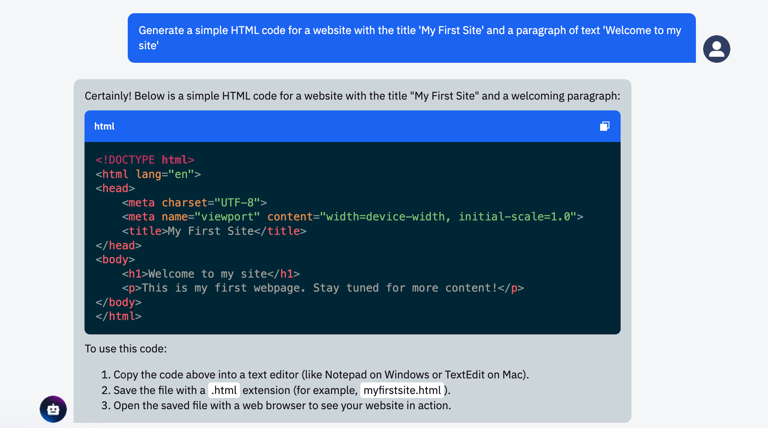
You can copy this code, paste it into a code editor like Visual Studio Code, save the file with an .html extension, and view the result in your web browser.
Creating a React web application
Next, we can ask the chatbot how to create a web application using the React library. The chatbot can tell us about the necessary steps, such as installing Node.js and using the command line. It is important to note that working with a chatbot sometimes requires a certain understanding of the topics in your subject area to know how to ask the right questions.
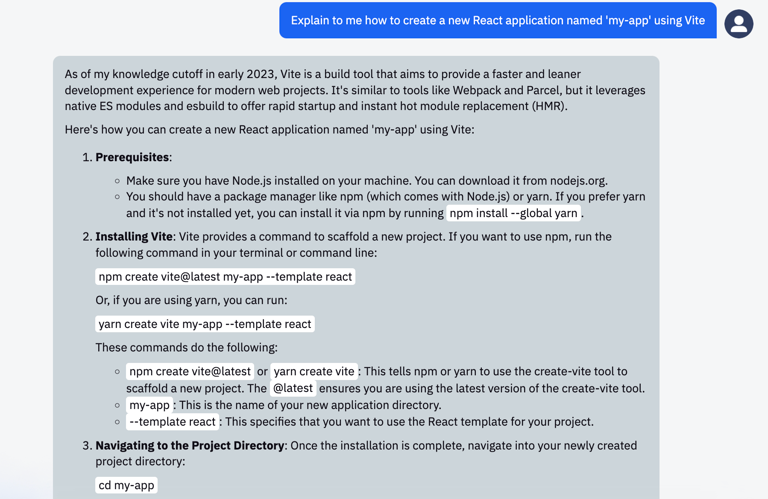
You can ask ChatGPT to provide an example of React component code or explain how to create a new React application using the Vite tool.
Before asking ChatGPT to generate code, make sure you have the necessary tools installed, such as Node.js and npm (Node Package Manager) or yarn.
Here is an example prompt for creating a new React application: "Explain how to create a new React application named 'my-app' using Vite."
ChatGPT might provide you with the following set of instructions:
Important notes
Remember that while ChatGPT is quite powerful and capable of generating code based on your instructions, it still depends on the correctness and accuracy of your prompts. Moreover, you may need to review and refactor the generated code to ensure it meets your requirements and code quality standards.
Now let's try it out in practice!
Practical assignment
Task:
Use ChatGPT to create a simple HTML website.
Instructions:
- Open the chat interface with ChatGPT.
- Give it a specific prompt to generate HTML code. For example, you can ask it to create a simple HTML structure.
- Review and refactor the generated code as needed.
- Create a new .html file, paste the code there, and open it in a web browser.
Example:
- Your prompt might look like this: "Please generate a simple HTML structure for a website with a heading and a paragraph of text."
- The response might be as follows:
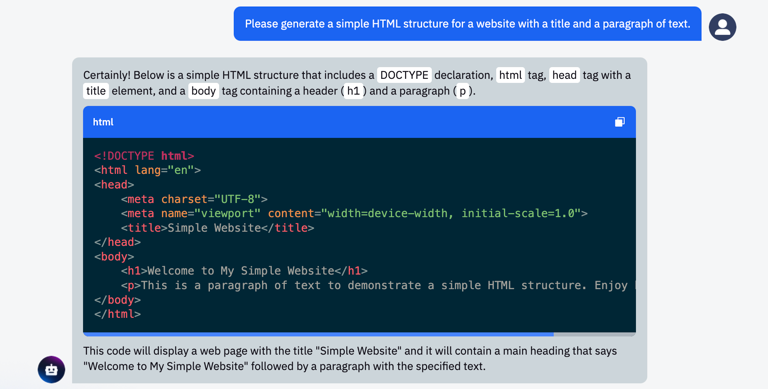
- Now you can create a new .html file, paste the generated code, and open the file in a web browser to see the result.
Conclusion
Thus, using ChatGPT for code generation can be a useful tool for automating routine tasks and speeding up the development process. However, do not forget that you must have basic knowledge of development and programming languages to use this tool effectively.