Lesson 5: Model Parameters
Welcome to the new lesson dedicated to the parameters of generative models! We have already learned the basics of writing prompts, and now we can move on to the settings to fully unlock the potential of neural networks. In this lesson, we will take a detailed look at parameters such as tokens, temperature, top_p, Frequency penalty, Presence penalty, and context length.
To make it easier for you to navigate, here is a quick cheat sheet on the main parameters. You can refer back to it whenever you want to quickly recall what each setting affects.
| Parameter | What it does | For creativity | For accuracy |
|---|---|---|---|
| Temperature | Controls the randomness of responses | 0.7–1.0 | 0–0.3 |
| Top_p | Restricts the selection of the next token | 0.8–1.0 | 0.2–0.5 |
| Frequency penalty | Penalizes the repetition of the same words | 0.5–1.0 | 0 |
| Presence penalty | Penalizes the appearance of already mentioned words and phrases | 0.5–1.0 | 0 |
Parameter Descriptions
Tokens. In the AI world, tokens are the smallest units of text that a model can process. Tokens can be whole words, word fragments, punctuation marks, or emojis. For example, in Russian, one token is roughly equal to two characters without spaces, while in English, it is about four characters without spaces. The number of tokens in your prompts and responses affects how long the model takes to generate an answer and how much you will have to pay for each request.
Temperature. This parameter controls the randomness of the model's responses. A higher value (closer to 1) makes the responses more random and creative, while a lower value (closer to 0) makes them more predictable and conservative. However, it is important to understand that excessively increasing the temperature can turn responses not just into creative ones, but into a meaningless jumble of words and symbols. This happens because at a temperature above 1, the model starts to consider even those tokens that are almost never found in normal speech as equally probable, causing the response to fall apart into strange and incoherent fragments.
Top_p (Nucleus Sampling). This parameter determines the probability with which the model selects the next token when generating text. A value of 1 means the model will consider all possible tokens for the next word, whereas a value close to 0 will force the model to choose only the most likely tokens.
Temperature and Top_p control creativity and are often adjusted together. A good rule of thumb: if you change the temperature, it makes sense to adjust top_p in the same direction. For most tasks, it is enough to tweak only one of these parameters and leave the other at its default value.
Frequency penalty. This parameter helps control the frequency of certain words appearing in the model's responses. A higher penalty value will decrease the likelihood of repeating the same words, while a lower value will allow the model to use them more often.
Presence penalty. This parameter controls how much the model prefers to use words and phrases that are already present in the context. A higher value will increase the chances of new words and phrases appearing, while a lower value will allow the model to repeat those already mentioned.
These two parameters are often confused, but there is an important difference between them. Frequency penalty reduces the likelihood of repeating words that have already appeared in the model's response itself—it fights self-repetition. Presence penalty reduces the likelihood of words and phrases appearing that were already in your prompt or context—it prevents the model from simply retelling your prompt. In practice, they are often used together, raising both penalties for creative tasks and leaving them at zero for tasks where accuracy is important.
Context length. This parameter determines how long the text can be that the model uses to generate a response. A longer context allows the model to remember more information from previous messages, but it can also lead to longer processing times and increased costs.
Applying Parameters in Practice
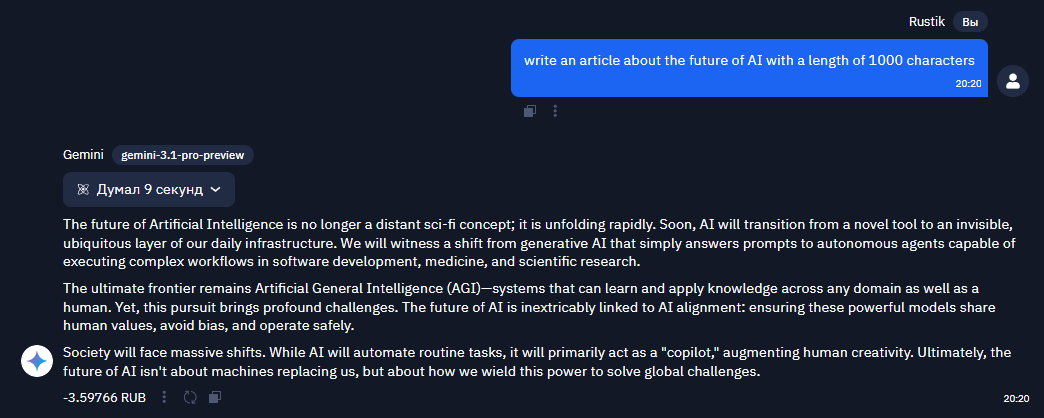
Now let's see how these parameters can change the model's output. Suppose we want the neural network to write an article about the future of AI.
Temperature = 0.2
Temperature = 1.2
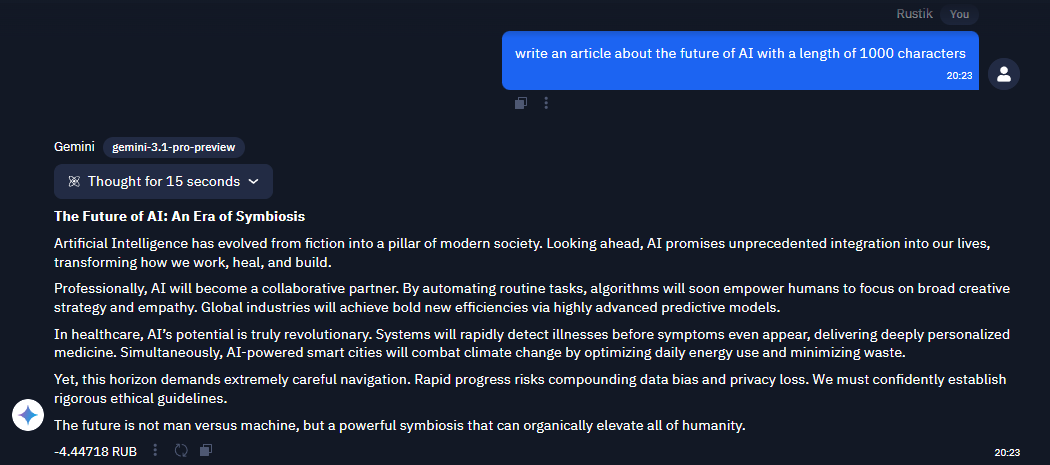
See the difference? At a low temperature, the text was predictable and classic, while at a high temperature, we got an unusual and original result, but the output contained strange words and phrasing. This is exactly the case where a temperature above 1 forced the model to choose unlikely tokens, and the coherence of the text suffered.
Let's Look at a Real Case Example.
Prompt: "Write 5 ideas for engaging Habr headlines for an article reviewing a new neural network." Let's try a temperature of 0.7 and top_p of 0.8:

Then we change it to a temperature of 0.3 and top_p of 0.5:

Do you see the difference? At a low temperature, the story was predictable and classic, while at a high temperature, we got an unusual and original story, however, there were strange words in the output.
Don't forget to write down your observations and conclusions. This will help you develop your skills in working with various parameters and improve your understanding of how the models work. See you at the practical assignment!